
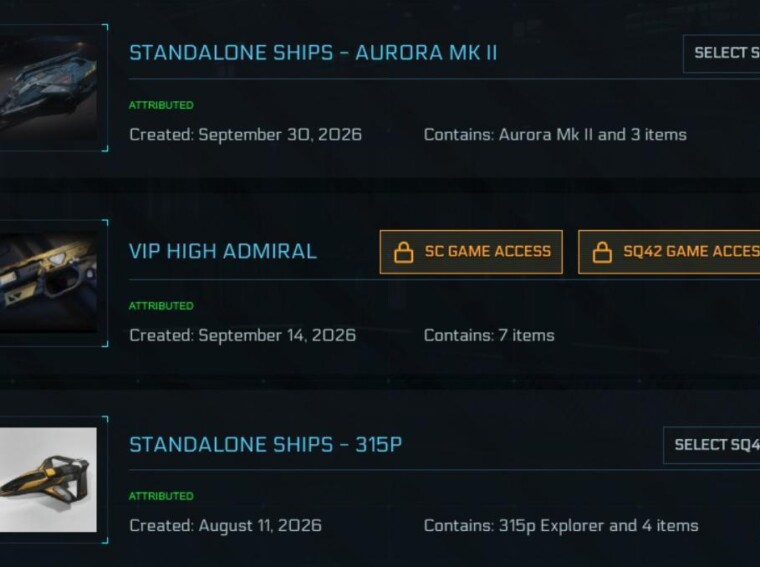
You have until November 1, 2026 to decide which pledge stays permanently locked on your Star Citizen account. Below, we cover where to set your Game Access pledge, how the default lock was picked, which package you should actually protect, and the gifting rules that arrived with the new Game Library. If you own more than one game package, sort this out before the window closes.
Star Citizen Protected Pledge Deadline and Rules
The selection window opened on October 1, 2026. Your choice becomes final on November 1, 2026.
|
Detail |
What It Means for You |
|
Selection window |
October 1 to November 1, 2026 |
|
Pledges protected |
One for SC and one for Squadron 42 |
|
One pledge with both games |
It can cover both locks on its own |
|
What gets blocked |
Melting (reclaiming for store credit) and gifting |
|
What still works |
CCU upgrades, plus every item inside the pledge stays |
|
Default lock |
An unmeltable pledge with the game, otherwise your oldest pledge with the game |
|
Number of changes allowed |
Unlimited until the deadline |
|
After November 1 |
Locked for good, no changes |
The short rule we follow: lock the pledge you would never melt anyway. For most accounts, that means an unmeltable reward or the cheapest starter package that grants the game.
How to Set Your Game Access Pledge (Step by Step)
You can only change the protected pledge from one menu. The full hangar view shows the lock, but it will not let you edit it. This is purely a website pledge setting, so your in-game wallet and Star Citizen aUEC balance stay untouched.
The switch happens instantly. There is no confirm or save button, so check the orange labels again after every click. We recommend taking a screenshot of the final state for your records.
What Is the Star Citizen Game Library?
The Game Library is a new section under your RSI Account Settings. You reach it from the Account Dashboard. It lists the games on your account with some basic details about each one.
During the selection period, clicking a game in the library takes you straight to the Game Access page above. CIG built this system as part of its preparation for the Squadron 42 launch and the road to 1.0. The goal is simple: give each game a permanent place on your account, so nobody loses access through an accidental melt or gift.
How the Default Pledge Lock Was Chosen
If you never touch the Game Access page, CIG's automatic pick stays in place. The system follows two rules for each game:
- If you own a pledge that grants the game and already cannot be melted, such as a High Admiral VIP reward, that pledge gets the lock.
- If not, your oldest pledge that grants the game gets the lock.
CIG also protects as few pledges as possible. If one package includes both games, it covers both locks. You can still split them, though. Protection works per game, so you can move the Squadron 42 lock to a different pledge and leave the SC lock where it is.
|
Your Account Situation |
What the System Locked by Default |
|
Only one game package |
That package |
|
Several starter packages |
The oldest one granting each game |
|
High Admiral VIP reward with game access |
The VIP reward |
|
A pledge restored through buyback |
Treated by its restoration date, not its original purchase date |
|
An unclaimed gift is your only access source |
The pending gift may be cancelled and that pledge protected |
|
An unclaimed gift, plus another owned pledge with the game |
The owned pledge; the gift stays claimable |
|
Ship-only pledges |
Never eligible |
One detail catches many Concierge players off guard. VIP status alone does not grant game access. Only the reward pledge with game access does, and since that reward is already unmeltable, it takes the lock first.
Which Package Should You Protect? Our Picking Rules
The default pick is not always the smart pick. Your oldest pledge might be a big legacy bundle you would rather keep flexible. Here is how we approach it.
Rule 1: Lock What You Can Never Melt Anyway
An unmeltable reward that grants the game costs you nothing to protect. You lose zero flexibility because you could not melt it before either.
Rule 2: Otherwise, Lock Your Cheapest Access Pledge
A locked pledge keeps its value inside your account forever. Put the lock on the lowest-value package, and your bigger bundles stay meltable and giftable under the usual rules.
Rule 3: Watch Where Your CCUs Go
You can still upgrade a protected pledge, and this is the trap. Any upgrade you apply to it gets locked too. If you chain a cheap starter up to a large ship, all that upgrade value becomes permanently non-meltable. If you plan long CCU chains, run them on standalone ships or other pledges instead.
If you mostly want a bigger ship to fly, you do not need to upgrade the locked pledge at all. Ships at in-game shops sell for aUEC, and players short on time often buy Star Citizen aUEC to grab one sooner. That keeps real-money value out of your permanently locked package.
Rule 4: Check Your Squadron 42 Source Separately
The SQ42 lock can only sit on a pledge that includes Squadron 42. If your only copy lives inside an expensive bundle, that bundle gets locked for SQ42 no matter what you do. The only way around it is to own a cheaper pledge with Squadron 42 and select it before November 1.
Rule 5: Buyback Starters Need Manual Selection
A restored starter pack will not pull the lock automatically, even if you originally bought it years ago. If you want it as your protected pledge, select it yourself on the Game Access page.
|
Example Account |
Best Pick |
Why |
|
One starter package only |
Keep the default |
Nothing else qualifies |
|
Old big bundle plus a newer starter |
Move the lock to the starter |
Default picked the old bundle |
|
Concierge with High Admiral reward |
Keep the reward |
It was already unmeltable |
|
Bundle with both games plus a SC-only starter |
Split: SC on the starter, SQ42 on the bundle |
Frees the SC side of your options |
|
Starter heavily upgraded through CCUs |
Consider another low-value pledge |
Keeps upgrade value meltable |
Pledges That Will Not Show in the Game Access List
A pledge only appears on the Game Access page if it grants one of the games. Ship-only pledges never show up, no matter how valuable they are. The same goes for pledges with only ships, insurance, weapons or liveries. RSI Support cannot change this.
To check a pledge quickly, open it in My Hangar and read its contents. If you see Star Citizen Digital Download or Squadron 42 Digital Download, it grants that game.
Pledge Gifting Changes in the Game Library Update
The same update changed how gifting works. These rules apply only to pledges bought after the new gifting system went live in October.
- You must mark a pledge as a gift at the time of purchase.
- The buyer cannot use a pledge marked as a gift.
- The recipient can upgrade it with CCUs once they receive it.
- Pledges bought before the change keep their existing gifting rules.
- Extra game packages and duplicate copies still work normally and stay giftable where eligible.
In practice, building a fully upgraded package to gift a friend no longer works the old way for new purchases. Only upgrades after the recipient claims the gift are confirmed. We suggest gifting the base package and letting your friend apply upgrades on their own account.
Troubleshooting the Game Access Page
If the selection buttons fail or the page will not load, try these steps:
- Disable your browser add-ons and plugins, then reload the page.
- Try a different web browser.
- If the problem continues, raise a detailed ticket with RSI Support.
Do not leave this to the last weekend of October. Support queues tend to grow close to deadlines, and a stuck page on October 31 leaves you with whatever the system picked.
Conclusion
The Game Library lock is a one-time decision with a permanent result, so treat it like one. Open the Game Access page, check which pledge holds each orange lock, and move it to the package you would never melt anyway. For most players, that is an unmeltable reward or the cheapest starter with access. Keep heavy CCU chains away from the protected pledge, check your Squadron 42 source on its own, and finish before November 1. Do that, and your hangar stays as flexible as the new rules allow.